![2020Logo_CanDo.png]](https://wissen.can-do.de/hs-fs/hubfs/2020Logo_CanDo.png?height=50&name=2020Logo_CanDo.png)
Companies plan with roles and skills in order to realistically assess projects at an early stage without having to commit to specific individuals from the outset.
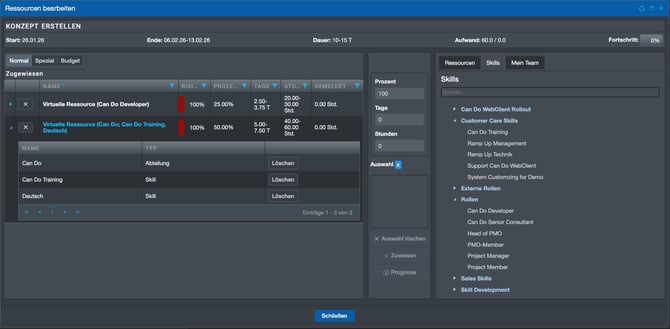
The demand for roles and skills arises directly from the project plan and the tasks it contains. Employees typically possess multiple skills and can often take on different roles. In early project phases—such as during the project idea or proposal stage—it is therefore neither necessary nor advisable to assign specific individuals. Instead, the required roles, necessary skills, and time allocation are defined in an abstract manner.
A typical example is the role of the project manager, who contributes a fixed percentage of their working time to project management throughout the entire project duration. This abstract form of planning creates maximum flexibility, as the actual assignment of individuals takes place at a later stage—based on availability and matching skills.
For which companies is role- and skill-based planning particularly suitable?
Role- and skill-based planning is particularly suitable for larger, multi-site companies with digital or remotely deliverable services.
The benefits of role- and skill-based planning increase significantly in companies with more than 100 employees. This approach is especially relevant in organizations whose project results are digital in nature, such as engineering drawings, software, or services that can be delivered independently of location.
Such companies often operate across multiple national or international locations where comparable roles and skills are available. Due to hierarchical structures, however, the actual availability of these resources is often known only locally. With planning in Can Do, capacity checks can be specifically extended to individual departments, multiple organizational units, or the entire company.
Project initiators thus gain transparency for the first time regarding whether sufficient capacity for certain roles or skills is available. In this way, the company’s full pool of competencies is incorporated into project planning.
How does role- and skill-based planning support long-term workforce development?
Role- and skill-based planning enables companies to identify future staffing needs early and respond proactively.
In many organizations, projects are planned in the medium and long term. In Can Do, requirements for roles and skills can be defined at all project levels—at project level, phase level, or for individual work packages.
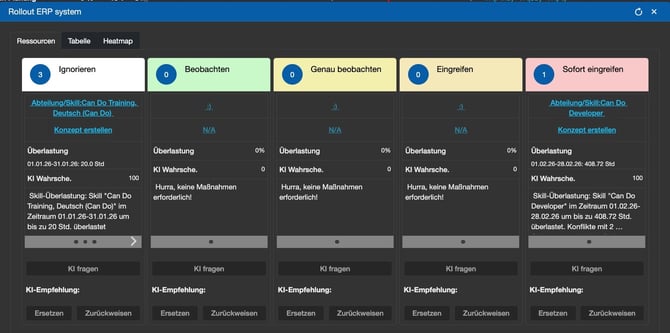
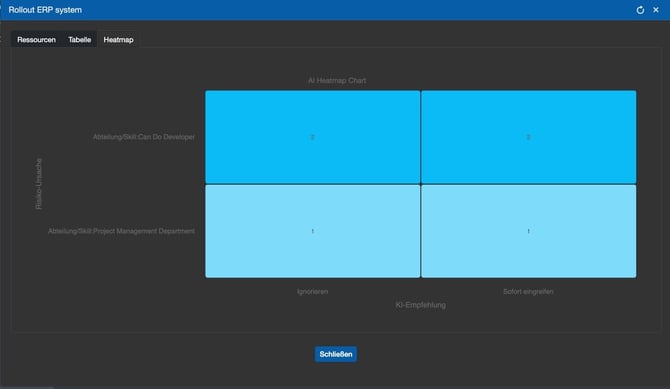
The software shows in real time whether sufficient capacity with the required roles or skills will be available at the planned time. If this is not the case, Can Do provides AI-supported insights into potential bottlenecks.
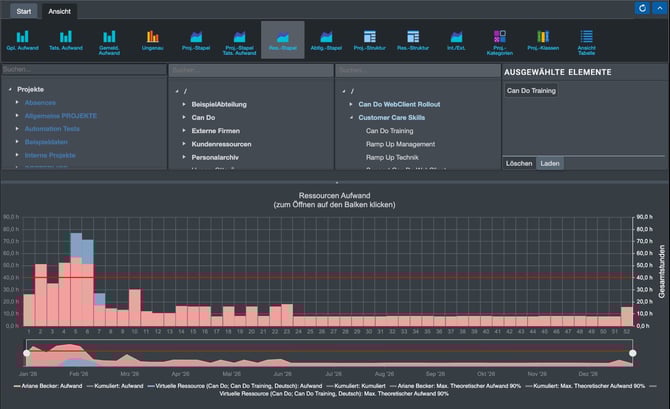
This makes it visible that certain roles or skills will be required in several months or even years in a scope that the company cannot currently cover. Based on these insights, targeted workforce development measures can be derived, such as training programs or early recruitment of new employees.
This ensures that the company’s capabilities systematically align with actual planned demand.
Why is role- and skill-based planning important for employees?
Role- and skill-based planning helps employees align their personal development with the company’s actual needs.
Employees must continuously develop by building new competencies or deepening existing skills. Through planning with roles and skills in Can Do, employees gain transparency regarding which competencies are needed today and in the future.
They can compare this demand with their own career and development goals. On this basis, training programs can be selected that create real value for the company.
This prevents the development of skills for which there is no medium- or long-term demand. At the same time, employees increase their future deployability in upcoming projects. Individual development is therefore more closely aligned with real project requirements rather than abstract qualification goals.
What advantages does role- and skill-based planning offer for managers?
Role- and skill-based planning provides managers with clear, comparable requirements and a reliable foundation for personnel and budget decisions.
Managers often receive staffing requests based on roles and skills for teams, departments, or entire business units. When these requirements are planned in Can Do, roles and skills are clearly and consistently defined.
Instead of vague descriptions such as “a very good project manager,” a project manager with a clearly defined skill level and specific certifications can be requested. This ensures that expectations are precisely formulated and misunderstandings are avoided.
Managers also gain insight into which roles and skills are most frequently requested within their department and which are less relevant. On this basis, workforce development measures can be steered in a targeted manner.
Investments in training or the hiring of new employees can be justified based on solid data rather than subjective assessments.
Why is a resource pool an alternative to a matrix organization?
A resource pool is an alternative organizational model to the matrix organization, in which employees are not assigned to departments but managed in a shared pool and allocated directly to projects.
Many companies are hierarchically structured and combine this line organization with a project organization—typically referred to as a matrix organization. Project managers request resources from business units, departments, or teams—often based on roles and skills—and the respective line manager decides which person will support the project.
This process can be fully mapped in Can Do and actively supported through the staffer function.
As an alternative to the matrix organization, the resource pool model eliminates traditional departments and team structures, and therefore department or team managers. Instead, all employees are managed within a shared pool without hierarchical levels.
Employees are described through skills and roles, and the project manager plans directly with these requirements. Can Do can then suggest suitable and available individuals.
Coordination takes place directly between the project manager and the employee. The main advantage lies in a significantly leaner and faster allocation process, as hierarchical approval stages are eliminated.
However, the model may also have disadvantages if workload and prioritization are not sufficiently managed, potentially leading to idle capacity.
Resource pools are frequently used in smaller companies with up to approximately 100 employees but are increasingly observed in larger organizations as well—sometimes limited to specific business units.
Can Do supports both organizational models and hybrid forms by enabling multiple resource pools to be established in parallel across different areas.
How does role- and skill-based planning reduce business risks?
Role- and skill-based planning helps identify and safeguard against critical knowledge dependencies.
In every company, there are a few employees who possess specialized, hard-to-replace knowledge. These individuals represent a central risk, as the absence of even a single employee can temporarily or permanently eliminate entire roles or critical skills.
The fewer people who possess a critical skill, the greater the risk for ongoing and future projects—and therefore for the company as a whole.
Through role- and skill-based planning in Can Do, such dependencies can be systematically identified. The organization gains visibility into which roles or skills are covered by only a few individuals.
Based on this, targeted risk mitigation measures can be initiated, such as knowledge transfer or upskilling additional employees. This broadens the distribution of critical know-how within the company and reduces dependency on individual key personnel.
How does role- and skill-based planning support the effective use of external service providers?
Role- and skill-based planning enables companies to use external service providers strategically while retaining critical knowledge internally.
In many organizations, certain roles or skills cannot be fully covered by internal employees—either due to missing specialized expertise or short-term peaks in project demand.
In such cases, external service providers, suppliers, or freelancers are engaged to close these gaps.
Planning with roles and skills in Can Do ensures that requirements for external profiles are clearly defined—including required skills, scope, and timeframe.
At the same time, transparency is created regarding areas where expertise exists only externally. This reveals potential dependencies on service providers that may represent a risk.
Based on these insights, companies can deliberately develop internal capabilities in new fields of expertise. External resources are then used consciously for temporary or rapidly changing topics, while critical core knowledge is built and secured internally over the long term.
What must be considered regarding data protection in role- and skill-based planning?
Role- and skill-based planning processes personal data and therefore requires clear rules regarding transparency, access, and usage.
When assigning specific skills and roles to employees, personal data is generated. This particularly applies when skill levels are used, for example a rating from 1 to 5 to indicate the degree of proficiency.
Access to this information should therefore be clearly regulated and limited to the employee concerned and defined managers.
Skill and role evaluations must not be used directly as a basis for personnel decisions or salary negotiations.
It is advisable to involve the works council or employee representatives at an early stage when introducing role- and skill-based planning.
Furthermore, skills should be defined objectively and transparently—for example through training certificates or documented professional experience. Subjective assessments by individuals should be avoided.
It is also important to maintain only those roles and skills that are actually required within the company, in order to avoid collecting outdated or irrelevant qualifications unnecessarily.
What is the difference between skills and roles?
Skills describe individual, specific competencies, whereas roles combine multiple skills into a higher-level functional profile.
The development of a skill database begins with a clear distinction between skills and roles. Skills describe concrete technical or methodological competencies, such as programming software, creating concepts, or performing a specific engineering task.
Roles, on the other hand, bundle several skills into a higher-level activity profile and thereby simplify planning.
Typical roles include software developer, project manager, or engineer. In addition, there are general skills that are organizational rather than technical in nature, such as work location or spoken languages and their respective proficiency levels.
The key difference is that roles provide an abstract view of required capabilities, while skills describe the specific area of expertise in detail.
An example would be an English-speaking project manager in Berlin capable of managing complex projects: the role is “Project Manager,” while the skills describe language, location, and professional proficiency.
Skills and roles can, of course, be used in parallel.
How should skill categories be structured?
Skill categories serve for structure and orientation and should be clear, logical, and regularly maintained.
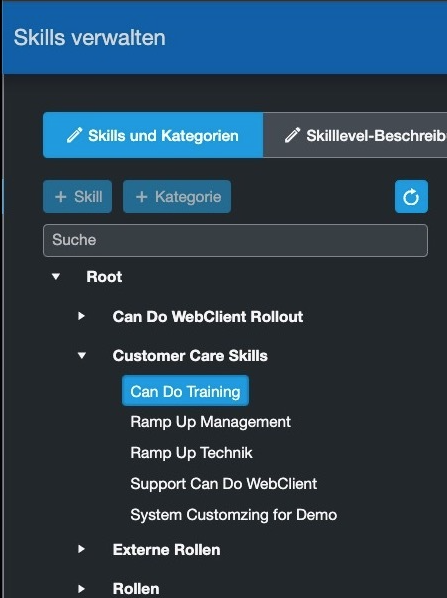
To introduce structure into a role and skill database, skills are organized into categories and any number of subcategories. Categories themselves are not used for planning; they serve solely for orientation, structured presentation, and the quick identification of skills.
It is advisable to begin with clearly defined top-level categories, for example separating roles, skills, and general attributes such as location or language. Under these top-level categories, subject-specific subcategories can then be gradually developed. At each level, concrete skills can already be created or additional subcategories can be added.
The degree of proficiency—how well a person masters a skill—is not represented through categories, but later through skill levels.
It is important to keep the category structure deliberately lean and to remove empty categories on a regular basis. Continuous maintenance by responsible individuals ensures that the skill database remains up to date, clear, and usable.
Which fields are relevant when maintaining a skill?
A skill requires only a few mandatory fields; however, additional fields allow it to be described more precisely, analyzed effectively, and maintained for long-term use.
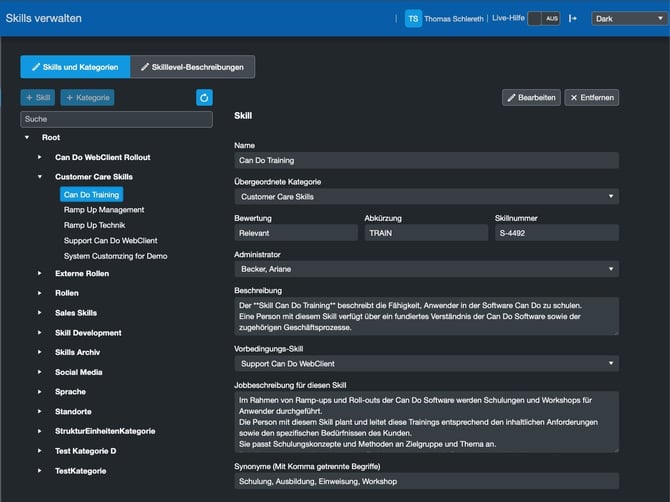
In principle, a skill in Can Do requires only a name—this is the only mandatory piece of information. Without a unique name, a skill can neither be used nor planned. In addition, each skill should be assigned to a higher-level category to ensure structured classification within the skill database and to improve findability.
The Rating field is a freely definable input field that can contain both numeric and alphanumeric values. It is primarily used for later evaluations, for example to identify particularly critical or strategically important skills.
The abbreviation of a skill is mainly used in evaluations, overviews, and reports to save space and keep displays clear and concise.
The skill number is a uniquely assigned identifier that allows skills to be referenced systematically and independently of their name.
The skill administrator or role administrator is the person responsible for maintaining, updating, and ensuring the quality of the skill. In practice, this role is often assumed by employees from HR or from the respective functional departments.
The description explains in detail what the skill technically entails. It is displayed in various areas of the software and helps users correctly interpret requirements and avoid misunderstandings.
Skills can also build upon one another. Using the prerequisite skill, it is possible to define which knowledge should ideally already be in place. Even though this dependency is not technically enforced, it can create a transparent and logical learning and development path for employees and managers.
The job description outlines the specific tasks associated with the skill in the project context. It is particularly relevant when projects are advertised internally or across locations. Interested employees can better understand the responsibilities, requirements, and expectations linked to a role or skill.
Finally, synonyms serve as alternative search terms. They prevent identical or very similar competencies from being created multiple times under different names and enhance both consistency and overall quality of the entire skill database.
What are skill levels and when should they be used?
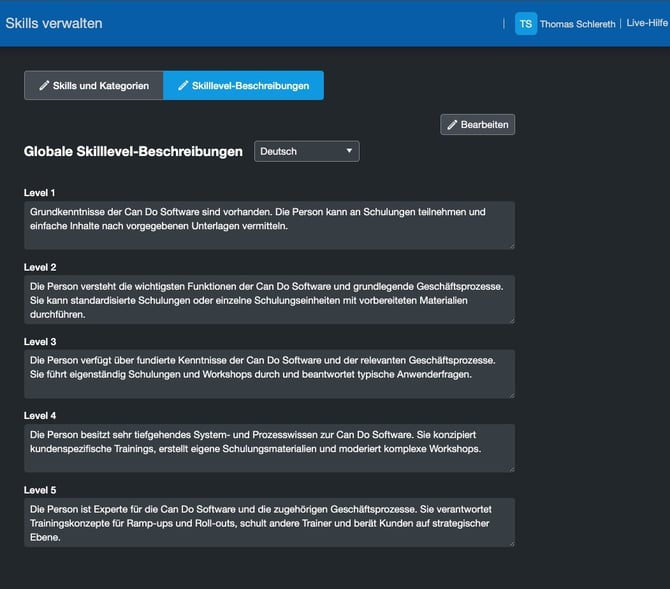
Skill levels complement skills with a qualitative scale and make professional requirements precise, comparable, and transparent.