| App | Function | Further information | Release Date |
|
Capacity analysis |
Expansion of time grids in the Capacity Analysis app. In addition to the existing weekly view, time grids for months, quarters, and years are now available. | Time grid in capacity analysis | December 2023 |
|
Table planner |
Skill planning through quick assignments in the Table Planner. Until now, only departments and resources could be assigned via quick assignment in the Table Planner. From now on, skills can also be scheduled via quick assignment. To activate this feature, please feel free to contact us. |
Skills in the table planner | October 2023 |
|
Staffer |
Passing on the preferred resource is possible. When a request is distributed to a subordinate department, the preferred resource is also carried over and continues to be displayed to the department head. |
Wished resource in the staffer | October 2023 |
| Gantt |
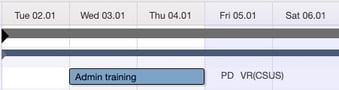
Names of assignments can be displayed in full. Currently, next to the objects (phase, packages, project) after assignment, the abbreviations of the resource are shown.
From now on, these can be displayed with their full names. A setting in the Can Do configuration file is required. Please feel free to contact us about this.
|
October 2023 | |
| Time tracking | Save favorites permanently. Favorites are permanently saved for each user. After clearing the cache, the favorites are still available. | Sept 2023 | |
| Gantt | Display of the reporting resource for ad-hoc assignments. | ad-hoc resources | Sept 2023 |
|
Gantt table planner staffer |
Enhanced server setting for Undo function. Option 1: Undo for all operations performed per object Option 2: Undo for operations performed per object by the respective user. (The server setting must be configured by the administrator.) | UnDo | July 2023 |
|
Project planner |
The 'Constant Effort' setting can be set as the default value for all users. | Constant Effort | July 2023 |
|
Various |
Formatted text in various fields | Formatted text | June 2023 |
English
![2020Logo_CanDo.png]](https://wissen.can-do.de/hs-fs/hubfs/2020Logo_CanDo.png?height=50&name=2020Logo_CanDo.png)